 Carie Giroux
Therapists and counselors
Scheduling emails, appointment reminders, newsletters and the admin that eats the time between sessions.
Business side only
I set up Claude, the AI assistant, for small business owners, so the inbox, the posts and the tasks you repeat stop running your day. You don't need the budget for an assistant or the time to learn AI. I set it up around the way you already work, and you have the final say.
Your inbox needs attention. The file you need takes too long to find. And setting up a better way of working keeps getting pushed behind the work itself.
Posting keeps slipping to next week. And the same task eats your evening, every single week.
You're curious about AI. But you don't have time for another tool to figure out, and you don't want to use one without knowing what it can access and what stays under your control.
That hesitation is fair. It means you care about your business and your clients.
So where would a little help make the biggest difference?
Service businesses where the owner is also the inbox, the scheduler and the marketing department. A few of the people I set up:
Scheduling emails, appointment reminders, newsletters and the admin that eats the time between sessions.
Business side onlyNew inquiry replies, follow-ups, marketing and office admin, so your best hours go to the work only you can do.
Business side onlyDeadline reminders, document-request emails and seasonal client updates, ready before tax season gets loud.
Business side onlySession follow-ups, client check-ins, and steady content between sessions, in your voice.
Proposals, meeting notes and reports drafted in minutes, so your hours go to clients, not paperwork.
Designers, event planners, salons and spas: inquiries, quotes, booking follow-ups and posts that keep going out.
For therapists, lawyers and accountants, I set up the business side of your practice, like scheduling, marketing and admin email. Client records stay out of it.
Want a system that works with client information? I build and test it with made-up sample data, so I never see a real client file. Once it's ready, you connect it to your real records yourself, and your own professional rules still apply.
If it will touch patient health information, you'll need a Claude Enterprise plan with HIPAA turned on. Claude's Pro, Max and Team plans can't be set up for HIPAA. We'll talk about the plan and its cost before I start.
Run a different kind of service business? If your week has an inbox, files and follow-ups, I can probably help. Book a free brainstorm.
Find the one that sounds most like your week. Here's the AI automation I'd set up for it.
I set up a morning brief that flags the emails that need you today, drafts replies in your voice, and sorts your files so you can find them. You read, adjust and send.
See the packageI build a content system you keep. Each month, one conversation becomes a month of posts, captions and your newsletter, in your voice.
See the packagePick the one task that eats your evenings, like proposals, meeting notes or invoice reminders, and I'll build Claude to handle it.
See the packageNo 40-hour program. In two guided sessions, I teach you Claude in your own account, in plain English, so you learn only what you'll actually use, and how to use it safely.
See the packageThree examples of what I set up. Each one runs on its own schedule and is waiting when you sit down, so the day starts with the work already sorted.
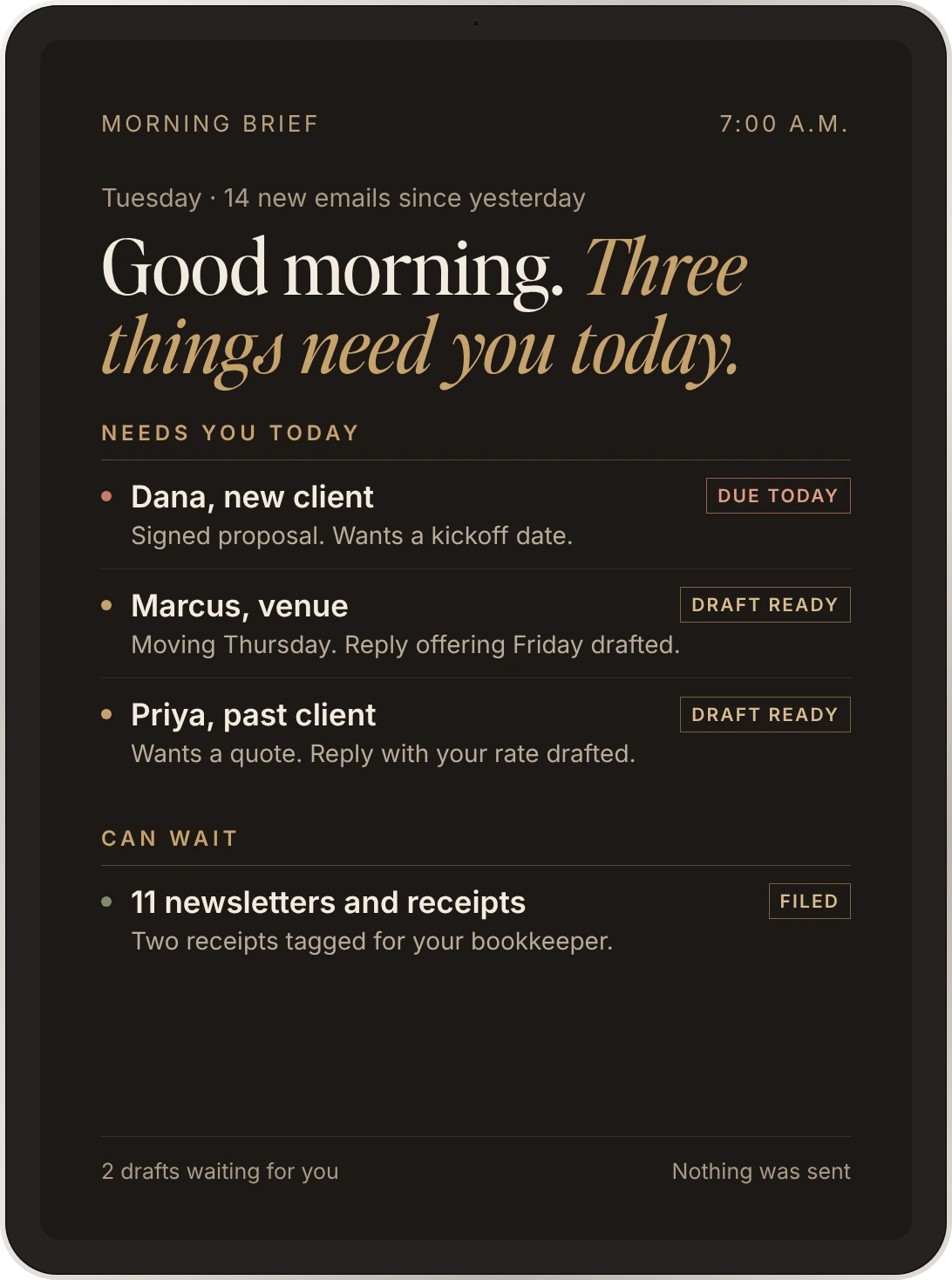
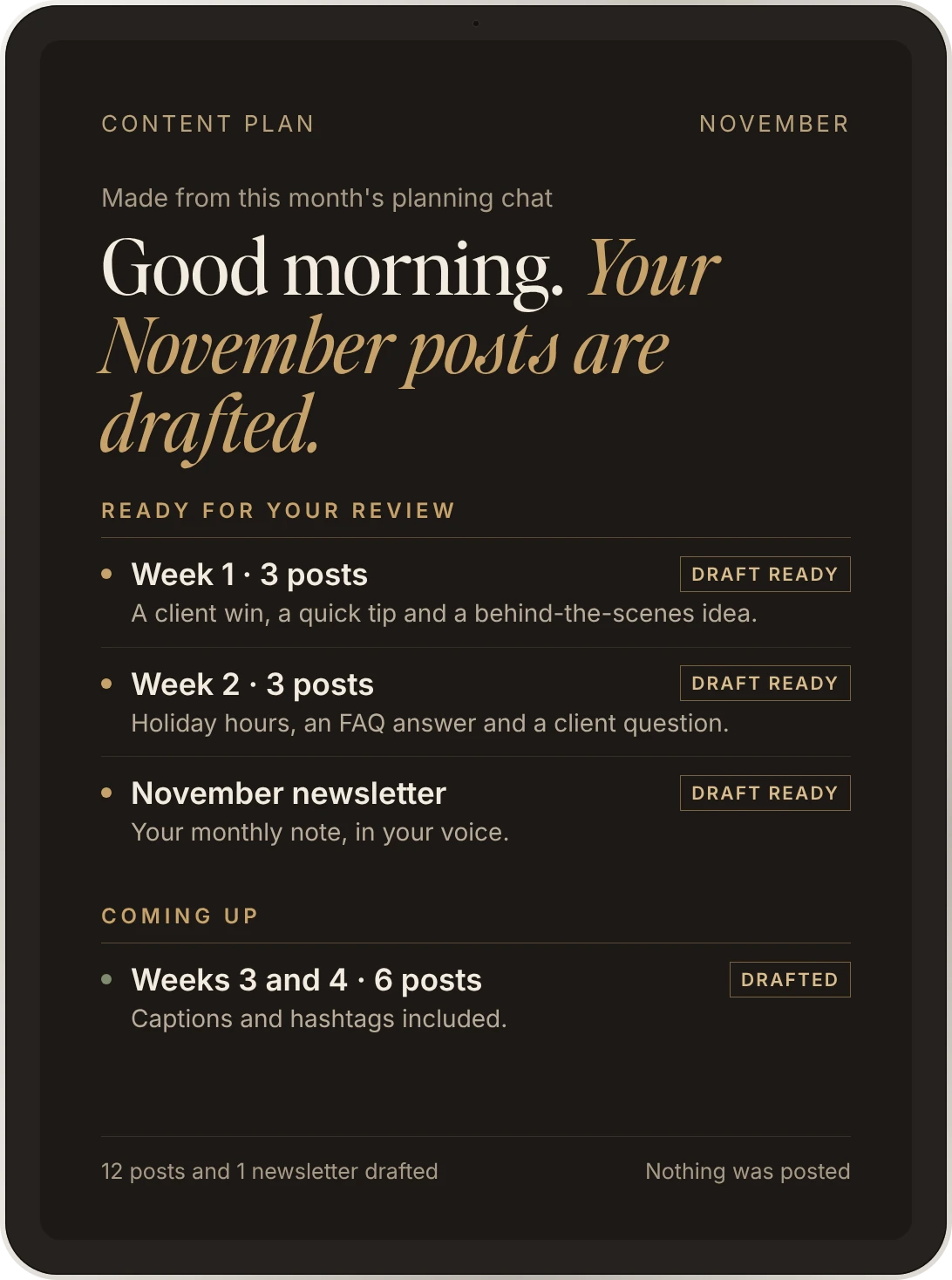
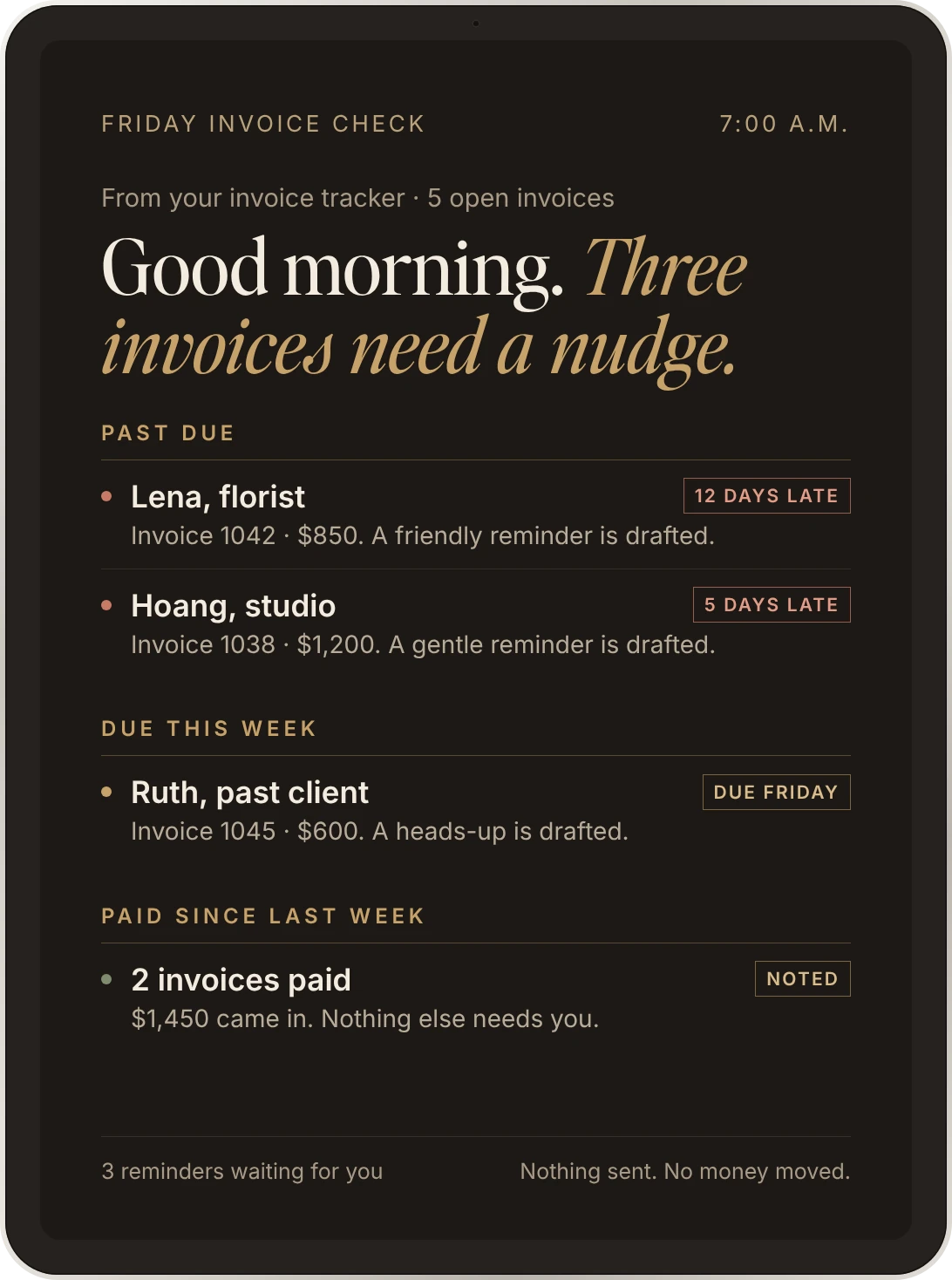
From people I've set up.
“You blew me away. This is the most amazing thing, and it's going to change my life. You just made school so much more enjoyable. I really feel like I can do my work now.”A family member, after a Claude Basics: Guided Setup
[Add a second client quote here][First name, type of business]

After more than 25 years in corporate work, I know how hard it can be to hand things over, especially when you care about getting them right.
As a Claude AI Champion, I've learned to use AI for practical support: drafting emails, organizing information and preparing work for my review. It doesn't replace my judgment. It gives me a better starting point.
Now, as an AI consultant, I help small business owners do the same, with thoughtful setup, clear boundaries and tools built around the way they work.
My goal is simple: less repetitive work, and more room for the work, and the life, you care about.
“If you can explain it to me, I can build it for you.”
Every draft waits for you. You read it, adjust it and send it. Nothing goes out without you.
I test every setup against examples we agree on before I hand it over.
No two setups look the same. Each one fits your tools, your voice and the way you already work.
AI can make mistakes, just like humans. That's why there's always a human in the loop.
Your first month of support is included. After that, it's your choice. It's never required.
No jargon and no prep needed.
We start with a free 30-minute brainstorm about what's taking up your time, where AI might help, and whether we're a good fit.
I'll recommend the package that fits, with a clear scope and price. You decide whether to move forward. No pressure.
I prepare your setup, then we put it in place together in your own account. We test it using agreed examples, and you get a simple guide and a short recorded walkthrough to refer back to. Done-for-you packages are ready 3–4 weeks after we plan. Claude Basics takes two sessions over 1–2 weeks.
Three done-for-you packages, each built around one part of your week, and one guided option if you'd rather learn Claude yourself. Not sure which fits? Take the 1-minute quiz, or talk it through in a free brainstorm.
“I'm drowning in email and loose ends.”
Not included: me managing your inbox each month, or anything sending on its own.
“I never post consistently.”
Not included: me writing or posting for you each month, automatic posting, or graphics. You run the system; it does the drafting.
“There's one task I keep doing by hand.”
Not included: more than one task, or connections to outside tools. Those are quoted separately.
“I'm new to Claude and don't know where to start.”
Not included: me building a system for you. That's what the done-for-you packages are for.
Need two? Add a second done-for-you package for $1,650 when you buy them together. One more task inside a package you have? $750.
Good to know: Every package is set up in Claude, for one person in one Claude account. Your Claude subscription (Pro or higher) is billed to you directly. Nothing sends, posts or pays on its own. Full details are in the questions below.
Your first month of Monthly Claude Support comes with every done-for-you package. After that, keep it or stop. Nothing renews unless you say yes. We work together on a scheduled screenshare. You sign in, and we review, adjust and test. No shared login and no background monitoring.
Up to 45 minutes together, plus up to 15 minutes of preparation or follow-up and a short summary.
One tune-up each month, starting with a short check-in survey about what has changed.
Unused time doesn't roll over. Need more hands-on help each month? Just ask. New workflows and connections are quoted separately.
Don't see yours? Bring it to the free brainstorm.
Claude is an AI assistant made by Anthropic. It can read, write, sort and draft much like a capable assistant, and it can run tasks on a schedule you choose.
Claude is the tool I know best and build in every day, so everything I set up runs there. My packages don't cover ChatGPT or other AI tools.
You'll need Claude Pro or higher, which you pay for directly to Anthropic. If you don't have it yet, we'll sort that out together before I start, and I'll tell you if your setup needs anything more.
That's fair, and it's not a problem. Your hesitancy has purpose. The brainstorming session is free, and it's there so we can find out together whether we're a good fit.
No. AI drafts, and you decide what goes out. Your proposal says what runs on a schedule and what waits for your review. Email drafts wait for you, nothing sends automatically, and nothing touches money on its own.
No. I'll show you the settings so they stop feeling scary. With monthly support, we work through any changes together on a screenshare, so you're never on your own.
That's what Claude Basics: Guided Setup is for. In two sessions, I teach you Claude in your own account, in plain English, so you learn only what you'll actually use, and how to use it safely.
Before I receive any access, we sign confidentiality and access terms. I prefer it that way, because it protects us both. I never ask for your password: you sign in, and we work together on a screenshare.
For firms that handle sensitive client information, like tax or financial records, we also agree in writing what the setup may access and what it must skip, before anything is connected.
Yes. I set up the business side of your practice, like scheduling, marketing and admin email, and keep client records out of it. If you want a system that works with client information, I build and test it with made-up sample data, so I never see a real client file, and you connect it to your real records yourself.
If it will touch patient health information, you'll need a Claude Enterprise plan with HIPAA turned on. Claude's Pro, Max and Team plans can't be set up for HIPAA. We'll talk about the plan and its cost before I start.
No. I set Claude up with your business profile, your brand voice and up to five of your own documents, so it knows the basics of how you work. It won't remember every detail or answer every question perfectly, which is why drafts always come to you first.
Start with what's wearing you out. Drowning in email and loose ends? Inbox Setup. Never posting consistently? Social Media and Newsletter Setup. One task you keep doing by hand? Your One-Task Setup. New to Claude and want to learn it yourself? Claude Basics: Guided Setup. Still not sure? That's what the free brainstorm is for.
Done-for-you packages take under 2 hours of your time. You fill in a short intake form, then we have a 45-minute planning call and a 60-minute handoff call in your own account. A 45-minute tune-up within 30 days is there if you want it. Your setup is ready 3–4 weeks after we plan.
Claude Basics: Guided Setup has two live sessions, 2 hours and then 90 minutes, and takes 1–2 weeks from the first session to your written guide.
The brainstorm is free. Each done-for-you package is $2,550, and Claude Basics: Guided Setup is $795. Anything bigger is priced in a written proposal after we talk, so you know the exact price before anything starts. Support plans are optional, and your first month comes with every done-for-you package.
No. Monthly support is there if you want it, and it's never required. You can run your setup yourself after the handoff.
By email. I reply within 1 business day, Monday to Friday. While I'm building, you'll get a short update every Friday with what's done, what's next and anything I need from you.
Revisions come as a short screen recording you can watch when it suits you, and your files live in one shared Google Drive folder. No extra apps to learn, and no meetings you don't need.
My prices cover my work. Your Claude subscription and any other software are billed to you directly, and I'll name anything you'll need before you say yes. Where I can, accounts are in your business's name, so you keep control.
Usually not. Everything I set up runs in Claude, alongside the business tools you already use, so you're not adding tools like Zapier unless a workflow truly needs them. If you don't have Claude yet, your plan needs an upgrade, or a task needs another tool, we talk about it and the cost before I start.
Done-for-you packages include two revision rounds before handoff, then your first month of Monthly Claude Support: an optional 45-minute screenshare tune-up within 30 days. Claude Basics: Guided Setup includes a written guide and one follow-up email exchange within 7 days. Before your tune-up, you send a short survey about what's working and what isn't, so we use the time well. General changes and new requests are quoted separately.
Yes. It lives in your own Claude account and keeps working after we're done. What I build is licensed to you for use in that account, and the details are in your agreement.
Each package is set up for one person in one Claude account. You're welcome to share what you learn with your team. Setting it up for other people, or having them join our calls, is quoted separately.
These are quoted separately, if I can take them on:
Three quick questions. You'll see a suggested starting point right away, no email needed.